

App Deep-Linking with Ionic [Android]
Recently, I was trying to implement Deep-linking in my Ionic App. Basically, I was building an App for Video Consultation with Doctors.
The App needs to be like Zoom, i.e. the user gets a link, and when the user clicks the link from the SMS received, the Android Phone will Prompt to open the link either with any browser available or my Application (if installed already).
How will the Device know to Open the Link in a Particular App?
To achieve this we will have to make some changes in our ionic app. We need to install a native plugin available for Ionic.
[UPDATE]: To start Deep-linking, install the node modules for Deeplinks.
npm install @ionic-native/deeplinks
Install plugin Deeplinks.
ionic cordova plugin add ionic-plugin-deeplinks
--variable URL_SCHEME=myapp --variable DEEPLINK_SCHEME=https --variable DEEPLINK_HOST=example.com
Let me describe the variables here:
- URL_SCHEME: Its basically can be anything you want in order to identify your Application.
- DEEPLINK_SCHEME: Its the protocol. Better leave it as ‘https’.
- DEEPLINK_HOST: Its the HOST URL to identify when to open the App.
There are some other optional variables. I am mentioning only those I have used and what I exactly understood at the time of implementation. For detailed documentation on Deep-linking, click here.
After you do this, you’ll find something like this in your package.json file.
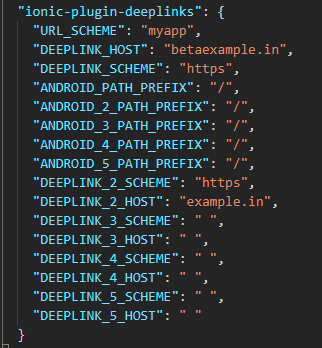
As you can see there are multiple DEEPLINK_SCHEME, DEEPLINK_HOST. These can be used if you have multiple URLs.
Like I have 2 URLs, one for Beta APIs and another for Production.
Once you do this, you will now get the option in your Device to open the link with your App.
How to get Arguments Passed in the URL/Link?
After you complete the above steps, now you need to make change in the app, where you want to read the Arguments passed in the link and do some tasks in the app based on that.
I wanted to build something like Zoom, whenever you click on the Zoom link received, the link opens up the App and automatically joins the Chat room without entering the room password.
What it does is, it reads the room id and password from the link, auto fills them in the respective required places and allows you to enter the room.
In order to achieve this type of Deep-linking, you need to place the following code either in your app.component.ts or in the first landing page of your app. (I have placed it in my dashboard page)
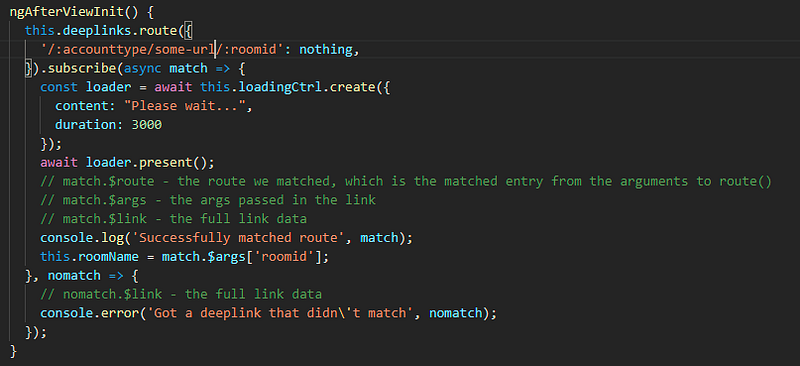
As you can see, you need to put your code inside ngAfterViewInit() lifecycle hook. This is important, because if you keep it inside the constructor, it will give an error, “Plugin deeplinks not installed”.
Here,
'/:accounttype/some-url/:roomid': nothing
is the URL after the host. (e.g., my complete URL is https://example.in/demo_acc/some-url/312kj12hj).
“nothing” basically is the path where you want to redirect after a route is matched. Since i didn’t want to redirect it anywhere, I just assigned a variable, nothing. Its just a by-pass, as these options are mandatory.
After that you can fetch all the details in the “match”.
match.$route
- the route we matched, which is the matched entry from the arguments to route()
match.$args
- the args passed in the link
match.$link
- the full link data
I am using Ionic 4 here. There might be some version mismatch though. Feel free to connect with your issues.
Disclaimer: This post may contain affiliate links. If you click and buy, we may receive a small commission at no extra cost to you. Read our full disclosure here.
